
Eisenhower Matrix
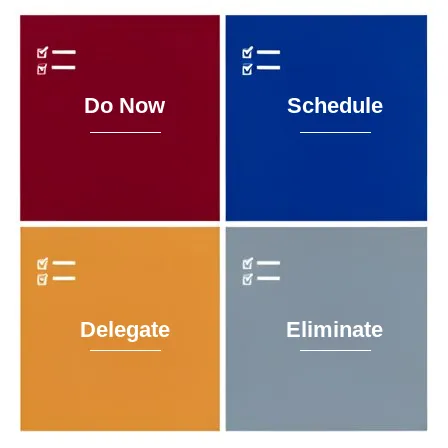
Eisenhower Matrix
Prioritise what matters. Sync with Google Tasks. Always know what to do next.
The Eisenhower Matrix is a decision-making framework used by executives and high-performers to separate what is urgent from what is important. This app brings that framework to your browser — backed by your own Google Tasks account so nothing lives in a silo and nothing gets lost.
Four quadrants. Four Google Tasks lists. One clean interface. Your data stays in your Google account — always.
- 2×2 priority matrix — Do Now, Schedule, Delegate, Eliminate
- Google Tasks sync — tasks map to Google Tasks lists and Calendar due dates
- Live 30-second updates — changes sync automatically across Tasks and Calendar
- Drag to reorder — rearrange tasks with drag and drop
- Move between quadrants — reassign tasks anytime
- Overdue banner — highlights overdue tasks across all quadrants
- Installable PWA — add to mobile home screen or desktop
- Offline shell — app loads offline with clear sync status
- Invite-only access — allowlist-based access; no task data stored or shared
The app requests the following OAuth scopes when you sign in with Google:
- openid – Identifies you as a valid Google account holder
- email – Reads your email address to verify you're on the access list
- Google Tasks (read/write) – To sync directly with your Google Tasks lists
No task data is ever sent to or stored on Solutóre's servers. Everything lives in your own Google account. You can revoke the app's access at any time from Google Account → Security → Third-party apps with account access.
1. Sign in with Google
click the Sign in button; you're redirected to Google's consent screen and back in seconds
2. Four lists are created automatically
on first login, the app finds or creates four Google Tasks lists prefixed with EM · (e.g. EM · Q1 Do Now). No existing lists are touched
3. Add tasks
tap + in any quadrant; set a title, optional notes, and a due date
4. Drag to reorder
drag tasks within a quadrant to set your own priority order within that quadrant
5. Move tasks between quadrants
use the ⋮ menu on any task card to move it to a different quadrant
6. See tasks in Google Calendar
tasks with due dates appear automatically in Google Calendar's task sidebar on the relevant date
7. Install the app
in Chrome or Edge, click Install in the address bar; on iPhone, use Safari → Share → Add to Home Screen
🔗 Launch the App
👉 Launch Eisenhower Matrix → https://eisenhower.solutore.com/
📘 Documentation & Support
For help, questions, or to request access:
- Email: [email protected]
- Support portal: https://support.solutore.com